
Azure Deployment Stack What-If: Previewing Template and Lifecycle Changes
Azure Resource Manager (ARM) what-if is a familiar safety check before deployment. It compares a Bicep template with the current Azure state and previews the resource operations ARM expects to make.
Deployment Stacks introduce a second kind of preview: stack what-if. It evaluates the template change, but it also knows which resources are managed by the named stack and which lifecycle action applies when a resource is no longer defined. That ownership context is the important difference.
This article uses two subscription-scope Bicep templates:
core-main.bicepdeploys the initial platform.core-main-2.bicepadds a subnet to the existing platform.
Select the subscription
Start by selecting the subscription where the resources and deployment stack live:
az account list
az account set --subscription "<subscription-id>"
The commands below use WestEurope and assume they run from the folder containing the Bicep files and .parameters directory.
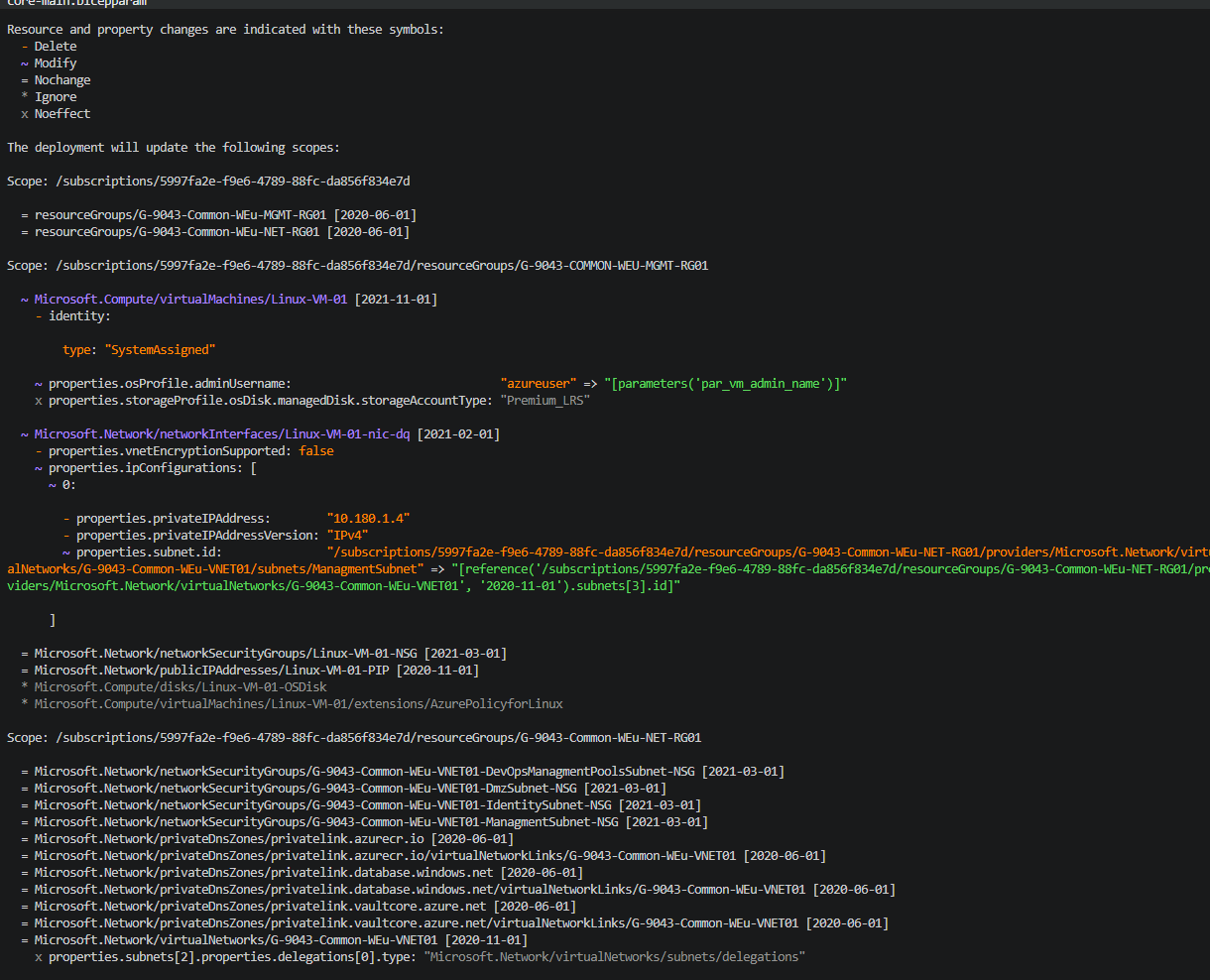
Standard ARM what-if
The traditional command answers one question: if I deploy this template now, what Azure resource changes will ARM make?
az deployment sub what-if `
	--location WestEurope `
	--template-file core-main.bicep `
	--parameters .parameters\core-main.bicepparam
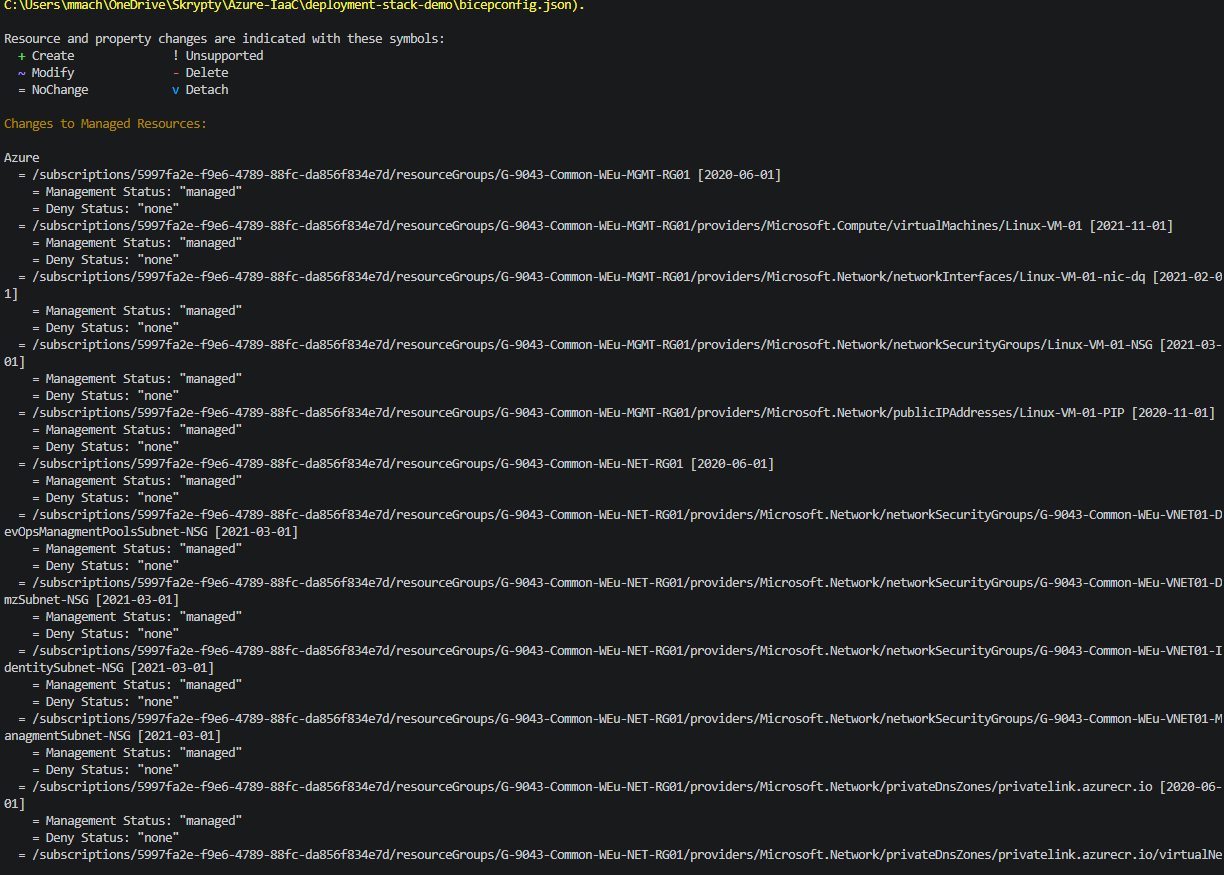
The result show changes alle the time to resources, event if noting was added or removed:
To preview the version that adds the subnet, use the second template and parameter file:
az deployment sub what-if `
	--location WestEurope `
	--template-file core-main-2.bicep `
	--parameters .parameters\core-main-2.bicepparam
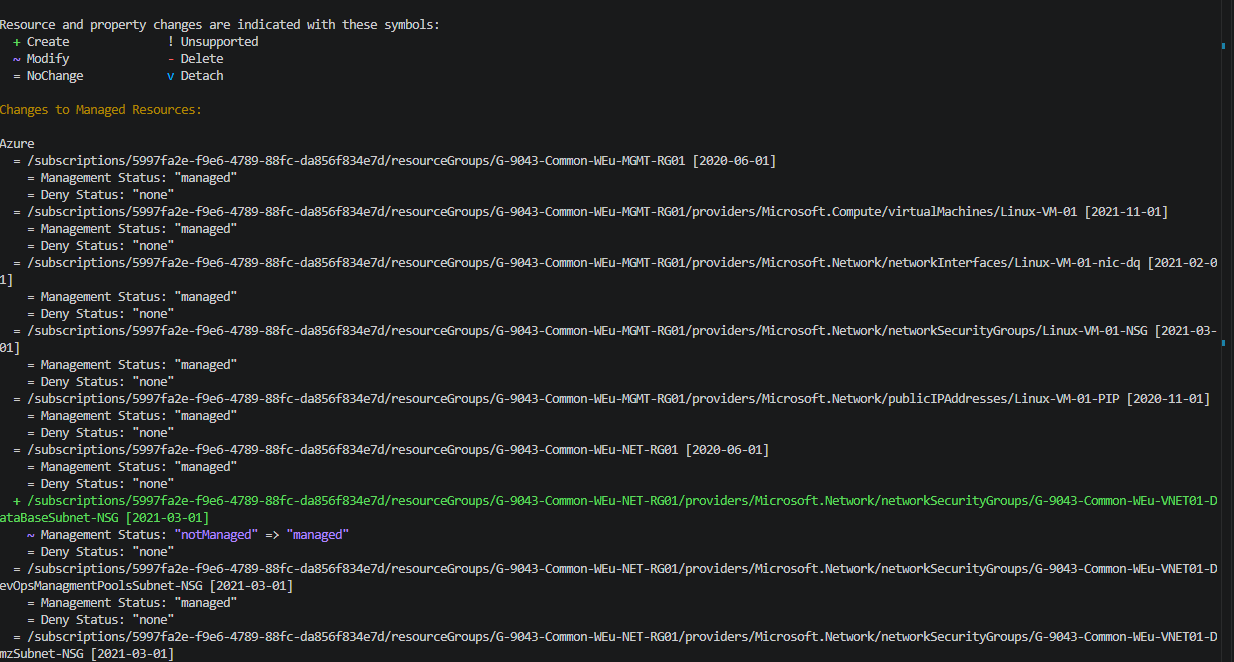
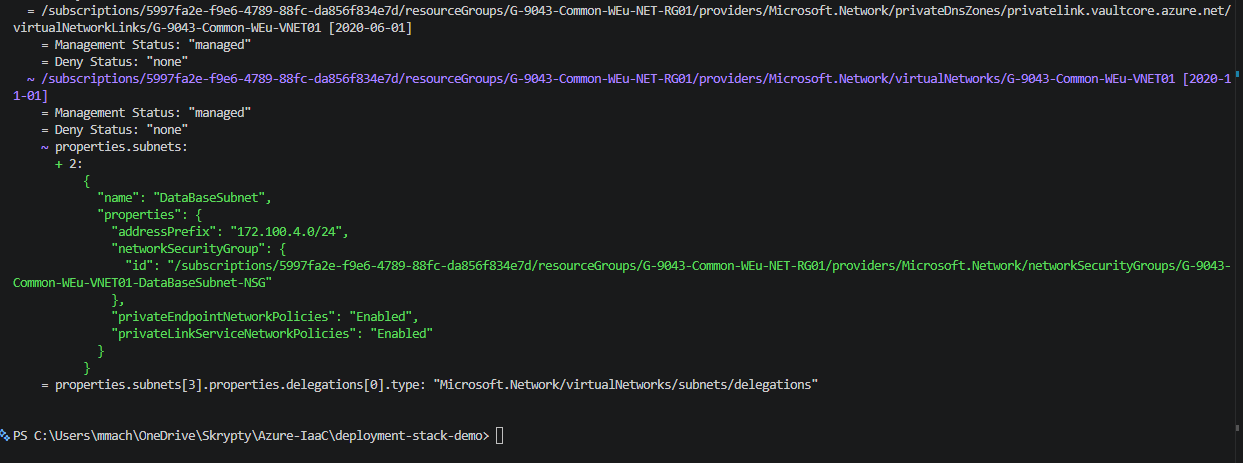
The result is a resource-level diff. For a subnet addition, the meaningful part of the output typically looks like this:
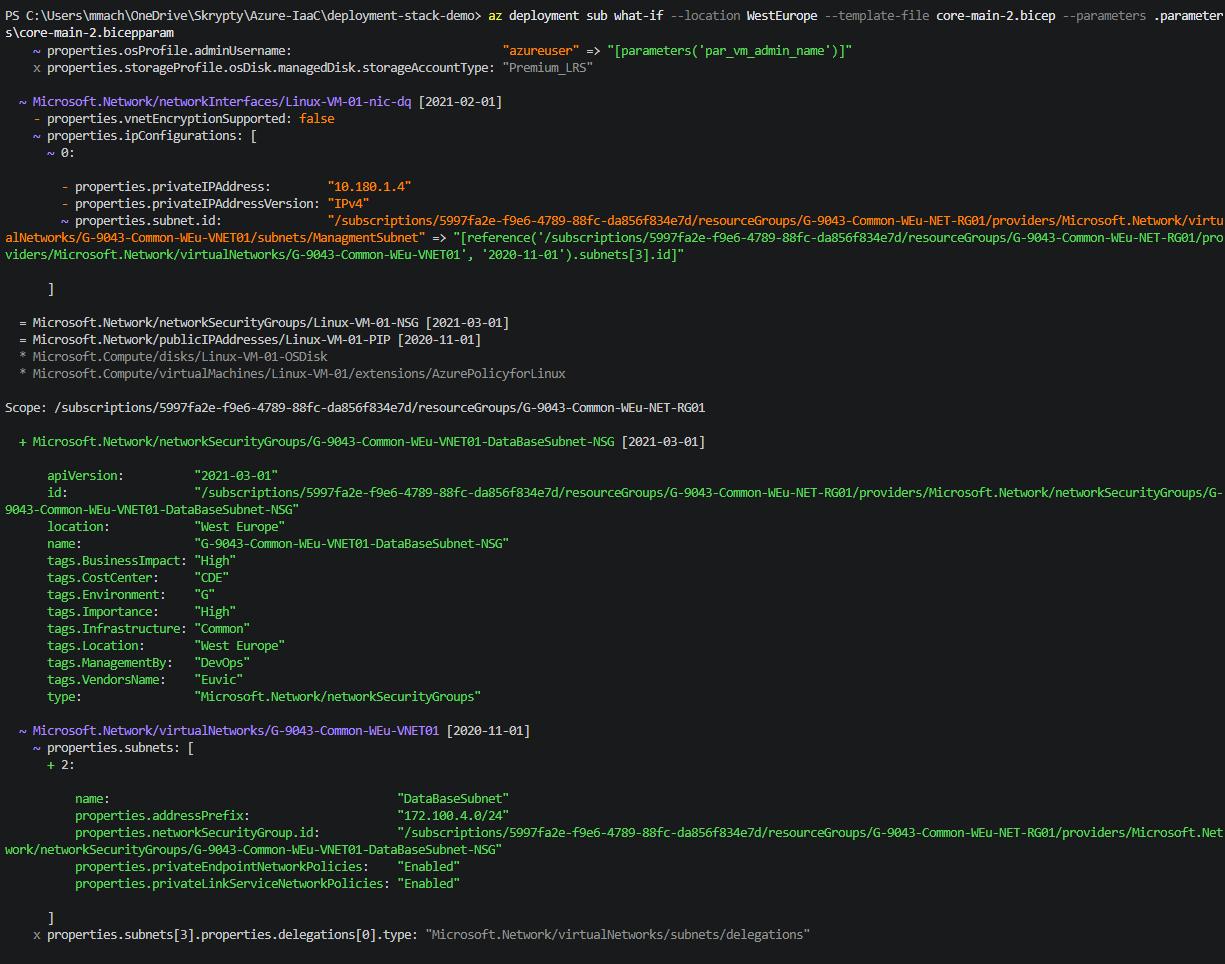
~ means an existing resource is modified. Depending on the Bicep implementation, Azure can instead show the subnet as a distinct resource operation. The key point is that normal what-if evaluates only the requested deployment and current Azure state.
Create the deployment stack
A Deployment Stack records the resources it manages. Create the initial stack with the same template, it converts existing deployment to Stack:
az stack sub create `
	--location WestEurope `
	--name CoreStack `
	--template-file core-main.bicep `
	--parameters .parameters\core-main.bicepparam `
	--action-on-unmanage detachAll `
	--deny-settings-mode None
--action-on-unmanage detachAll is significant. When a resource that was previously managed by the stack is removed from a later template, the stack stops managing it but leaves the resource in Azure.
Documentation is describing retention policy between 1 dot 30 days but CLI will show error that is between hours.


To preview the stack with no changes you can run this command:
az stack-whatif sub create `
	--name CoreStack `
	--stack-id /subscriptions/<subscription-id>/providers/Microsoft.Resources/deploymentStacks/CoreStack `
	--location WestEurope `
	--template-file core-main.bicep `
	--parameters .parameters\core-main.bicepparam `
	--action-on-unmanage detachAll `
	--deny-settings-mode None `
	--retention-interval PT1H # {"code": "DeploymentStackInvalidRetentionInterval", "message": "The retention interval '5.00:00:00' is invalid. It must be between 1 hour and 3 hours."}
The result if will don’t create any additional information if there non changes event made by azure:
Preview a stack update with stack what-if
Stack what-if updates the question to: what will this template do to the resources and lifecycle ownership of this existing stack?
Use the same stack name and provide the existing stack ID:
az stack-whatif sub create `
	--name CoreStack `
	--stack-id /subscriptions/<subscription-id>/providers/Microsoft.Resources/deploymentStacks/CoreStack `
	--location WestEurope `
	--template-file core-main-2.bicep `
	--parameters .parameters\core-main-2.bicepparam `
	--action-on-unmanage detachAll `
	--deny-settings-mode None `
	--retention-interval PT1H # {"code": "DeploymentStackInvalidRetentionInterval", "message": "The retention interval '5.00:00:00' is invalid. It must be between 1 hour and 3 hours."}
For this subnet scenario, the stack preview should include the same planned virtual-network update seen in normal what-if. It is also evaluated against the inventory managed by CoreStack.
Exact property output varies by Azure CLI, Bicep version, and the current state of the virtual network. Review the command output before applying the stack update.
The difference at a glance
| Area | az deployment sub what-if |
az stack-whatif sub create |
|---|---|---|
| Context | Submitted template and current Azure state | Submitted template, Azure state, and the existing stack |
| Ownership | Does not track resource ownership | Tracks the resources managed by the named stack |
| Resource omitted from a later template | An incremental deployment normally leaves it unchanged | It becomes unmanaged and follows --action-on-unmanage |
| Lifecycle decisions | No stack lifecycle policy | Previews the consequences of stack ownership changes |
| Best use | Validate a normal ARM/Bicep deployment | Validate an update to infrastructure governed by a Deployment Stack |
The difference becomes most valuable when a previously managed resource disappears from the template. With detachAll, the stack releases ownership and the resource remains in Azure. With a delete action, removing that resource from the template can become a destructive lifecycle operation. Stack what-if gives that decision a preview before the stack is changed.
Azure CLI and PowerShell references
The Azure CLI az stack-whatif reference documents create, show, list, and delete operations for Deployment Stack what-if results at resource-group, subscription, and management-group scope.
For PowerShell automation, use New-AzSubscriptionDeploymentStackWhatIfResult from the Az.Resources module. It creates a persisted, subscription-scoped what-if result resource and accepts the same key inputs: stack ID, template, parameters, lifecycle action, and deny settings.
The equivalent PowerShell command for the subnet update is:
New-AzSubscriptionDeploymentStackWhatIfResult `
	-Name CoreStackWhatIf `
	-StackResourceId "/subscriptions/<subscription-id>/providers/Microsoft.Resources/deploymentStacks/CoreStack" `
	-Location WestEurope `
	-RetentionInterval PT1H `
	-TemplateFile .\core-main-2.bicep `
	-TemplateParameterFile .\.parameters\core-main-2.bicepparam `
	-ActionOnUnmanage DetachAll `
	-DenySettingsMode None
Recommended workflow
- Run
az deployment sub what-ifwhile authoring a Bicep template to understand ordinary ARM resource changes. - Create the Deployment Stack after the base deployment is understood.
- Before changing a stack-managed template, run
az stack-whatif sub createagainst the existing stack ID. - Review both the resource diff and the effect of
--action-on-unmanagebefore applying the stack update.
Normal what-if tells you what a template will do. Deployment Stack what-if tells you what the template will do and how it affects the ownership and lifecycle of stack-managed resources.
Leave a comment