Azure Custom Guest Configuration with PowerShell DSC and Azure Guest Configuration.
Azure Custom Guest Configuration with PowerShell DSC
Azure Guest Configuration extends Azure Policy into the operating system of Azure virtual machines and Arc-enabled servers. A custom guest configuration lets you describe a desired state in PowerShell DSC, package it, host it, and use Azure Policy to audit or remediate that state at scale.
This article walks through a Windows example that enforces a legal logon message. The same process applies to IIS features, Windows optional features, users, registry values, and other DSC resources.
Important: Test every package in a non-production subscription first. An
AuditAndSetpackage changes the guest operating system when it detects drift.
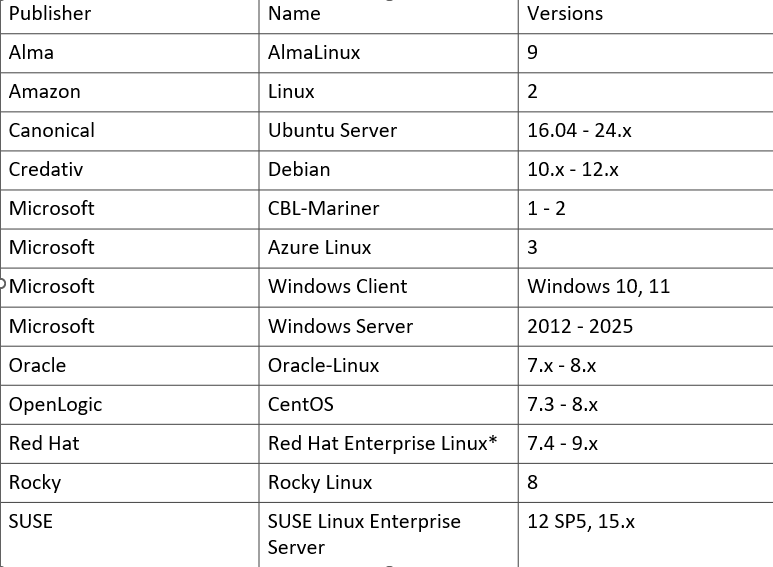
Matrix of supported systems
Machine configuration policy definitions are inclusive of new versions. Older versions of operating systems available in Azure Marketplace are excluded if the Guest Configuration client isn’t compatible. Additionally, Linux server versions that are out of lifetime support by their respective publishers are excluded from the support matrix.
How the pieces fit together
The workflow has five parts:
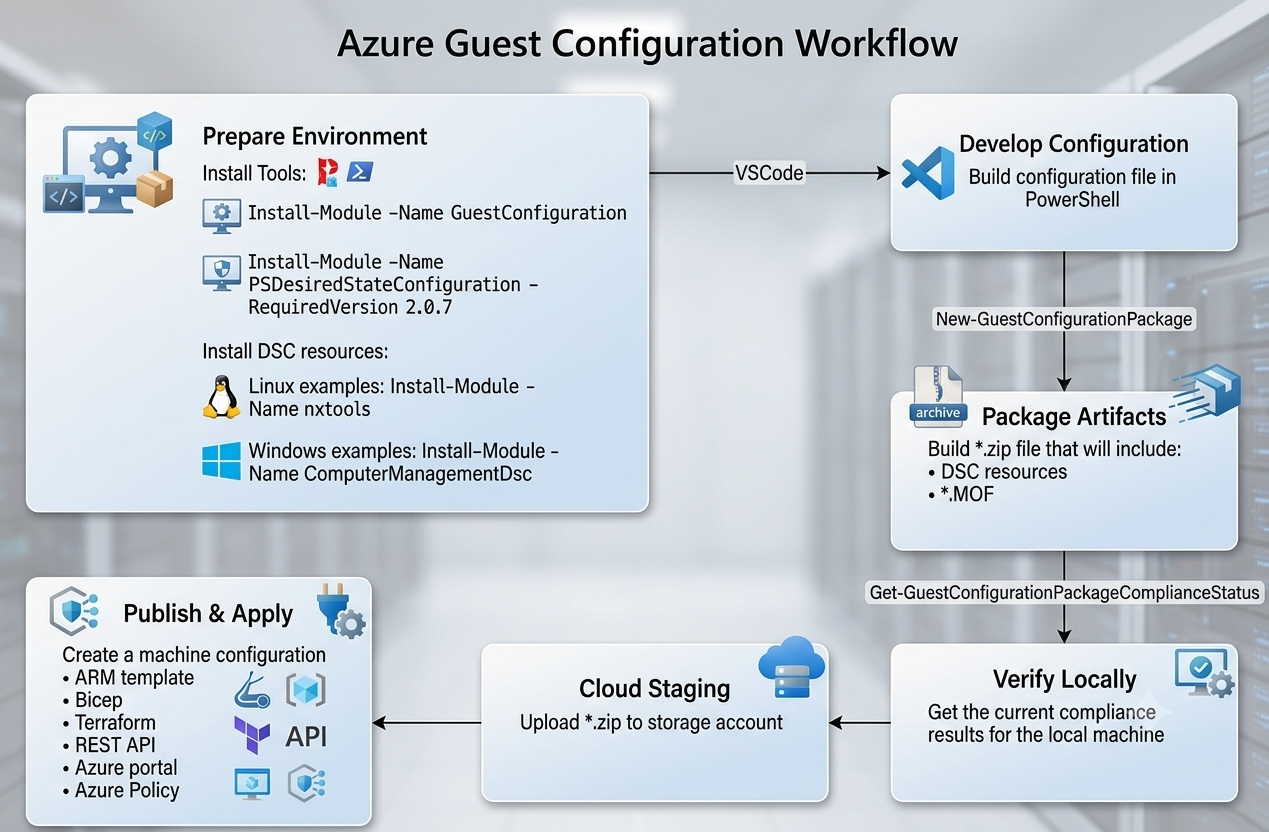
- Author a DSC configuration and compile it into a MOF file.
- Package the MOF with the Guest Configuration module.
- Validate the package locally and calculate its content hash.
- Upload the ZIP package to HTTPS-accessible blob storage.
- Assignee configuration package to Virtual Machine.
Prerequisites
Before creating a custom package, prepare the authoring workstation and Azure environment.
| Requirement | Why it is needed |
|---|---|
| Windows authoring workstation | This example uses Windows PowerShell DSC resources and creates a Windows MOF. |
| PowerShell 7 | Recommended for building and testing Guest Configuration packages. |
PSDscResources module |
Supplies the DSC resources used by the configuration, such as Registry. |
GuestConfiguration module |
Creates, validates, and turns a package into an Azure Policy definition. |
| Azure PowerShell sign-in | Required to upload content and deploy or assign the generated policy. |
| HTTPS-accessible package URI | Each target machine must be able to download the ZIP package from the URI. Azure Blob Storage is a common choice. |
| Azure permissions | Use a role that can create policy definitions and assignments, and can upload the package to the selected storage account. |
| Supported Azure VM or Arc-enabled server | The target must be able to receive the Guest Configuration extension and reach Azure Policy and the package URI. |
Install the two DSC modules on the authoring workstation:
Note: PSDesiredStateConfiguration is required in version at lest 2.0.7
Install-Module -Name PSDscResources -Scope CurrentUser
Install-Module -Name GuestConfiguration -Scope CurrentUser # Work only on PowerShell 7

Get-Module -ListAvailable -FullyQualifiedName PSDscResources
Get-Module -ListAvailable -FullyQualifiedName GuestConfiguration
Sign in to the tenant and select the subscription where the policy will be assigned:
Connect-AzAccount
Set-AzContext -Subscription '<subscription-id-or-name>'
Step 1: Virtual Machine need to have those perquisites
⁉️ Resource provider on subscription need to be registred: Microsoft.GuestConfiguration.
⁉️ System Assigne Identity / User Managed Idenity.
⁉️ Virtual machine extension is enabled, To use machine configuration packages that apply configurations, Azure VM guest configuration extension version 1.26.24 or later, or Arc agent 1.10.0 or later, is required.
⁉️ Azure Arc servers are supported.
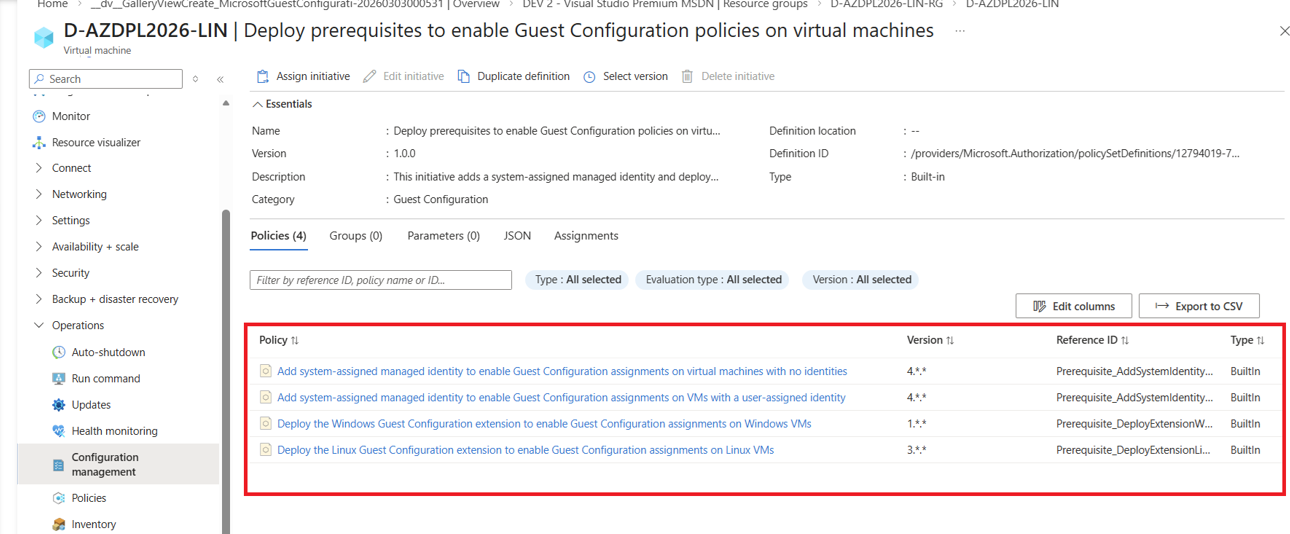
Prerequisites can be added by Azure policy to all servers on different scope:
Step 2: Author and compile the DSC configuration
Guest Configuration packages use a compiled DSC MOF. The following configuration writes a title and body for the Windows interactive logon message.
Configuration SetupLogonMessage {
    Import-DscResource -ModuleName PSDscResources

    Node 'localhost' {
        Registry LogonMessageTitle {
            Key       = 'HKEY_LOCAL_MACHINE\SOFTWARE\Microsoft\Windows\CurrentVersion\Policies\System'
            ValueName = 'legalnoticecaption'
            ValueData = 'Security Warning'
            ValueType = 'String'
            Ensure    = 'Present'
            Force     = $true
        }

        Registry LogonMessageBody {
            Key       = 'HKEY_LOCAL_MACHINE\SOFTWARE\Microsoft\Windows\CurrentVersion\Policies\System'
            ValueName = 'legalnoticetext'
            ValueData = 'Authorized access only. All activities are monitored and recorded.'
            ValueType = 'String'
            Ensure    = 'Present'
            DependsOn = '[Registry]LogonMessageTitle'
            Force     = $true
        }
    }
}

SetupLogonMessage -OutputPath .\SetupLogonMessage
Compilation creates SetupLogonMessage.mof in the output folder. Keep the configuration source in version control alongside the generated policy files, but rebuild the MOF and package whenever the configuration changes.
Step 3: Create the Guest Configuration package
Note: PowerShell 7 need to be running as local administrator
Choose the package type deliberately:
| Type | Behaviour |
|---|---|
Audit |
Reports whether the setting is compliant; it never changes the machine. |
AuditAndSet |
Reports compliance and applies the DSC configuration when the machine is non-compliant. |
For the logon-message configuration, create an AuditAndSet package:
Note: Package name need to exactly the same as configuration file.
$params = @{
    Name          = 'SetupLogonMessage'
    Configuration = './SetupLogonMessage/SetupLogonMessage.mof'
    Type          = 'AuditAndSet'
    Force         = $true
    # FrequencyMinutes = 180 # Default is 15 minutes.
}

New-GuestConfigurationPackage @params
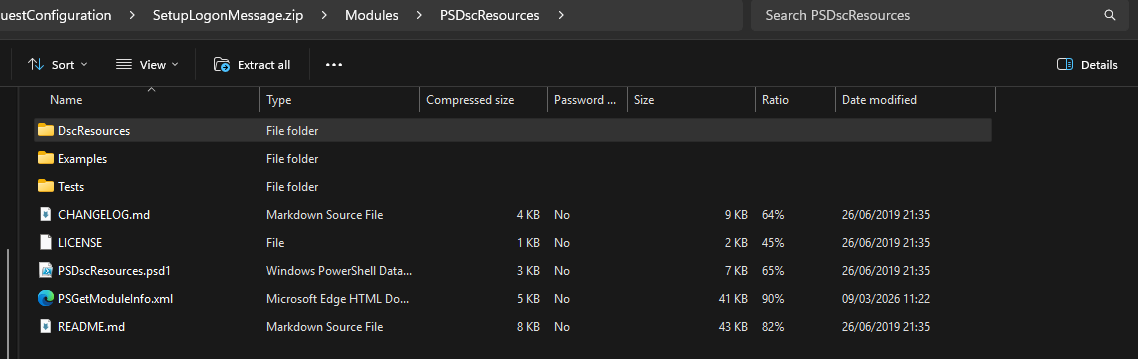
Zip file will contain resources and config file.

Step 4: Validate the package before publishing
Validate locally before you place the ZIP in storage or create a policy definition. This catches packaging errors and gives you the hash that Azure Policy uses to identify the exact package version.
Get-FileHash .\SetupLogonMessage.zip
Get-GuestConfigurationPackageComplianceStatus -Path .\SetupLogonMessage.zip
The compliance command should return a result instead of a packaging or resource-loading error. If it fails, confirm that every DSC resource referenced by the MOF is available to the Guest Configuration packaging process and that the MOF path is correct.
Step 5: Publish the ZIP to a stable HTTPS URI
Upload the ZIP to Azure Blob Storage. The policy definition must reference a URI that every target machine can reach over HTTPS. A blob URI with a time-limited SAS token is useful for testing, but production packages should use an access method and renewal process that will not unexpectedly expire.
After upload, keep the content URI and the SHA-256 value from Get-FileHash available. Treat a package update as a versioned release: publish a new ZIP, validate it, then update the policy definition or create a new policy version.
Step 6: Deploy guest configuration to one virtual machine
For a single test VM, create a Guest Configuration assignment directly on the VM. This does not create an Azure Policy definition or policy assignment. Azure installs or updates the Guest Configuration extension as part of processing the assignment.
Install the Azure PowerShell module that provides the assignment cmdlets:
Install-Module -Name Az.GuestConfiguration -Scope CurrentUser
Set the values for the target VM and the published ZIP. The content hash must be the SHA-256 value returned in Step 4 for the exact ZIP file at $contentUri.
$resourceGroupName = '<resource-group-name>'
$vmName            = '<virtual-machine-name>'
$contentUri        = 'https://<storage-account>.blob.core.windows.net/<container>/SetupLogonMessage.zip?<sas-token>'
$contentHash       = (Get-FileHash -Path '.\SetupLogonMessage.zip' -Algorithm SHA256).Hash

$assignmentParams = @{
    GuestConfigurationAssignmentName = 'SetupLogonMessage'
    ResourceGroupName                = $resourceGroupName
    VMName                           = $vmName
    GuestConfigurationName           = 'SetupLogonMessage'
    GuestConfigurationVersion        = '1.0.0'
    GuestConfigurationContentUri     = $contentUri
    GuestConfigurationContentHash    = $contentHash
    GuestConfigurationAssignmentType = 'ApplyAndAutoCorrect'
    GuestConfigurationKind           = 'DSC'
}

New-AzGuestConfigurationAssignment @assignmentParams
ApplyAndAutoCorrect applies the AuditAndSet package and corrects drift. To use an Audit package instead, set GuestConfigurationAssignmentType to Audit; the extension reports compliance but does not change the VM.
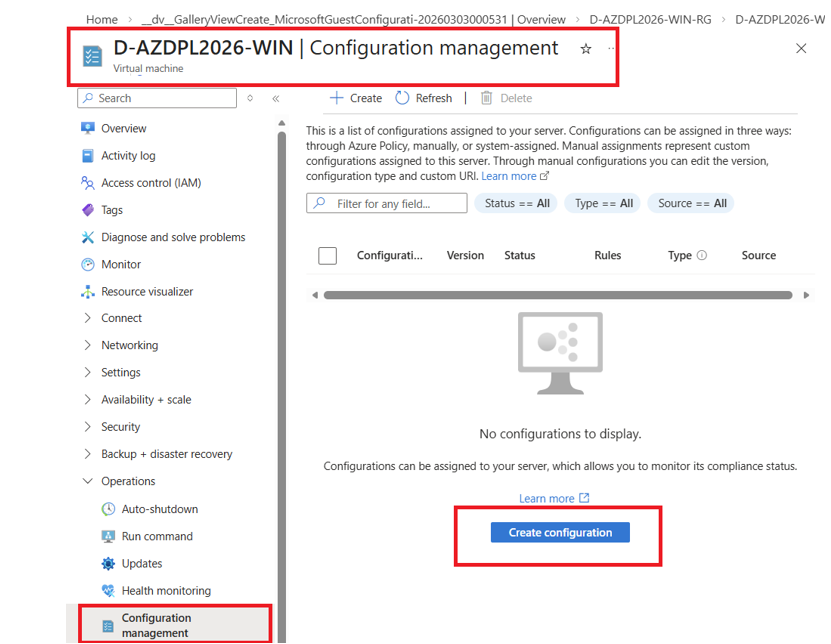
Configuration can be added by Azure portal, as well from Virtual machine management resources.
Check the assignment status and verify the expected values on the VM:
Get-AzGuestConfigurationAssignment `
    -ResourceGroupName $resourceGroupName `
    -VMName $vmName `
    -GuestConfigurationAssignmentName 'SetupLogonMessage'

Get-ItemProperty `
    -Path 'HKLM:\SOFTWARE\Microsoft\Windows\CurrentVersion\Policies\System' `
    -Name legalnoticecaption, legalnoticetext
Check assignment is also available form Azure portal from Virtual Machine resource management plane.
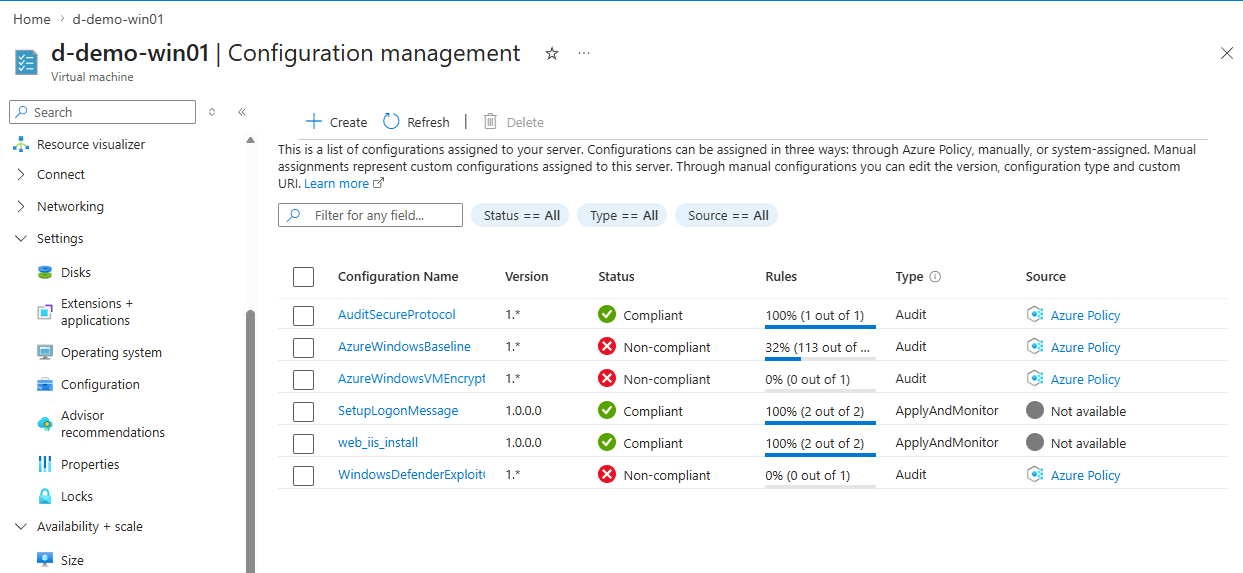
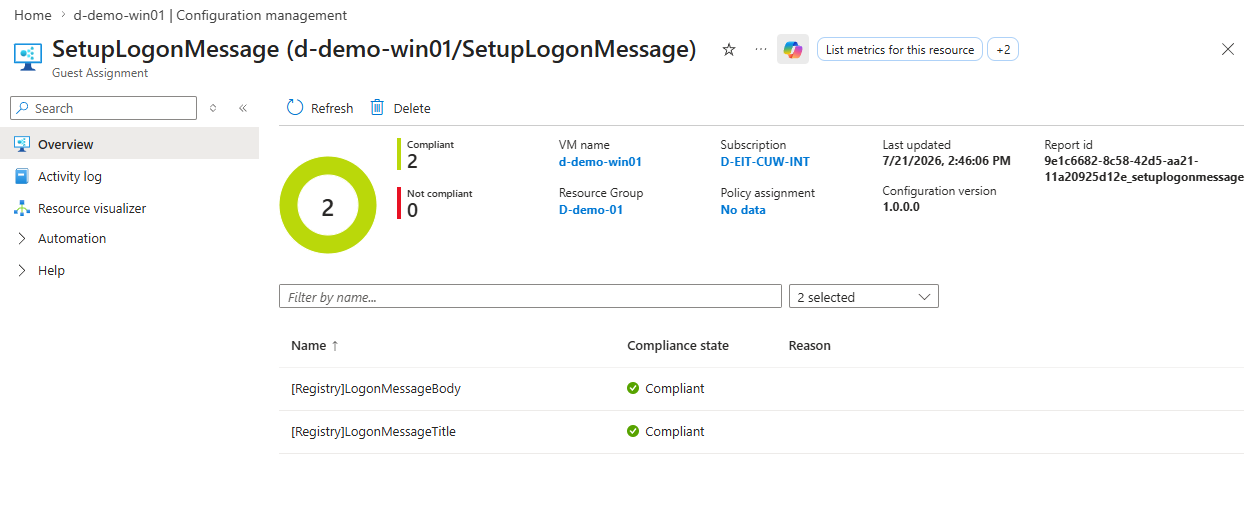
Note: The assignment must show a successful provisioning state before the configuration can report compliance. Ensure the VM can reach the package URI over HTTPS and that the SAS token remains valid for the test.
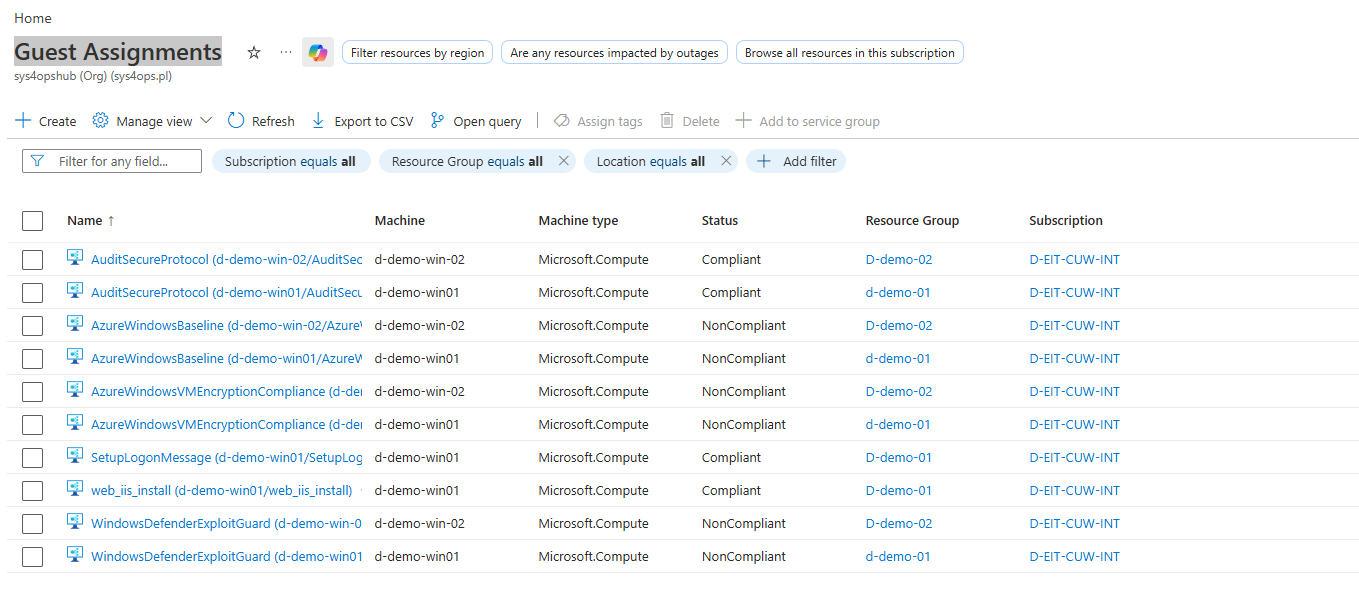
Guest Configuration assignment can be check globally for all resources in section Guest Assignments in Azure Portal
DSC (Guest Configuration) custom package authoring and deploying process
Common problems
| Symptom | What to check |
|---|---|
| Package creation fails | Confirm the MOF exists and that required DSC modules are installed and importable. |
| Local validation fails | Run Get-GuestConfigurationPackageComplianceStatus from the package directory and resolve missing resource dependencies. |
| Machines show no result | Confirm the VM or Arc server is supported, connected, and able to receive the Guest Configuration extension. |
| Package download fails | Verify DNS, HTTPS egress, storage firewall rules, and that the package URI or SAS token remains valid. |
| Unexpected remediation | Confirm the package was built with Audit, not AuditAndSet, before assigning it broadly. |
| A package update is ignored | Increase the policy/package version and update the policy definition to point to the intended artifact. |
Summary
Custom Guest Configuration turns a DSC configuration into a control that can be measured across a fleet. The reliable loop is simple: compile the MOF, package it, validate it locally, publish it to a durable HTTPS location, generate the policy, and assign it to a limited test scope before expanding the rollout.
Examples of code
Code examples of configuration can be found on this repo in GitHub - Blog code examples Github