
Microsoft DSCv3 build and deploy classic resources ActiveDirectoryDSC
Deploying Active Directory with Microsoft DSC v3 — A Configuration-as-Code Approach
Introduction
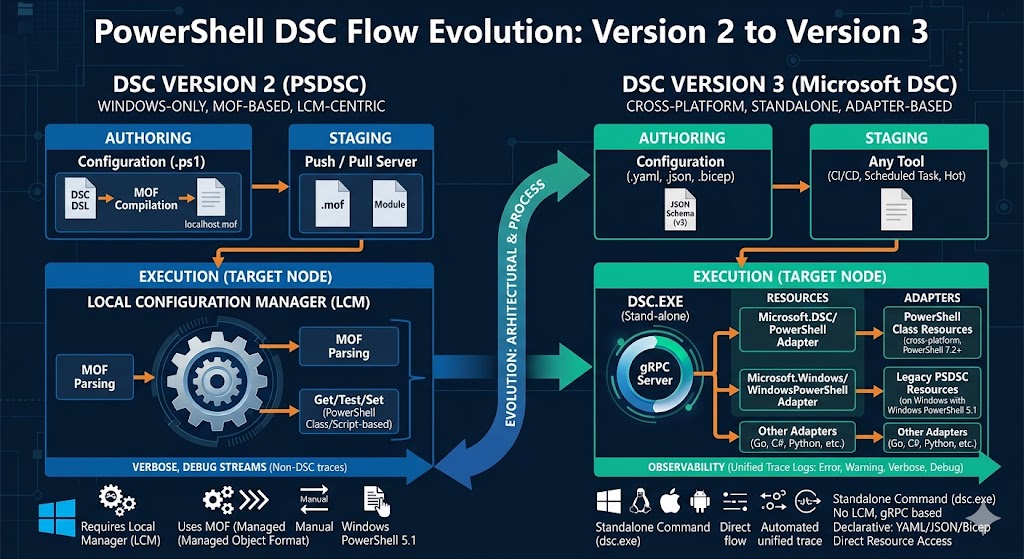
Microsoft Desired State Configuration (DSC) v3 is a cross-platform, declarative configuration management engine built in Rust. Unlike its PowerShell-based predecessors (DSC v1 and v2), DSC v3 is a standalone binary (dsc.exe) that orchestrates resources defined in YAML documents. It supports the full PowerShell DSC adapter ecosystem, enabling teams to configure Windows infrastructure — including Active Directory — using pure YAML files.
This post walks through a complete, modular Active Directory deployment built on DSC v3, covering every configuration file, parameter file, and the commands used to apply them.
Why DSC v3 for Active Directory?
Traditional AD deployment relies on PowerShell scripts or manual steps that are difficult to audit, version, and reproduce. DSC v3 brings:
- Declarative YAML — describe what you want, not how to do it
- Idempotency — running the same configuration multiple times produces the same result
- Modularity — split large configurations into focused, reusable include files
- Parameter separation — keep environment-specific values (domain names, passwords) out of the configuration files
- Built-in dependency management —
dependsOnensures resources are applied in the correct order
Prerequisites
Before running any configuration, ensure the following are in place on the target Domain Controller:
Search DSC v3:
winget search DesiredStateConfiguration
Name                              Id            Version Match                          Source
----------------------------------------------------------------------------------------------
DesiredStateConfiguration         9NVTPZWRC6KQ  Unknown                                msstore
DesiredStateConfiguration-Preview 9PCX3HX4HZ0Z  Unknown                                msstore
DSC v3                            Microsoft.DSC 3.2.0   Tag: desiredstateconfiguration winget
Install DSC v3:
winget install --id 9PCX3HX4HZ0Z --source msstore
Install the ActiveDirectoryDsc PowerShell module:
Install-Module -Name ActiveDirectoryDsc -Repository PSGallery -Force
Verify DSC v3 is available and can discover resources:
dsc resource list
Project File Structure
The configuration is split into a layered directory structure to separate concerns:
config/ADS/
├── ads-root-forest.dsc.yaml          # Stage 1 – Forest/domain creation
├── ads-root.dsc.parameters.yaml      # Parameters for root forest deployment
├── ads-child-forest.dsc.yaml         # Stage 1 (optional) – Child domain creation
│
└── ADS-Include/
    ├── ads.main.dsc.yaml             # Stage 2 – Orchestrator (Include entries)
    │
    ├── config/
    │   ├── ads.ou.dsc.yaml           # OU hierarchy definition
    │   ├── ads.admin-users.dsc.yaml  # Administrative user accounts
    │   ├── ads.groups.dsc.yaml       # Delegation security groups
    │   ├── ads.groups-members.dsc.yaml    # Group membership assignments
    │   ├── ads.ou-delegation.dsc.yaml     # OU permission entries (ACLs)
    │   └── ads.finegrained-password-policy.dsc.yaml  # PSO policies
    │
    └── parameters/
        ├── ads.parameters.yaml            # Domain root path parameter
        └── ads.admin-user.parameters.yaml # Admin user credentials
Stage 1 — Forest and Domain Creation
ads-root-forest.dsc.yaml
This is the entry point for bringing up the first domain controller. It installs the required Windows features and then creates the AD forest using ActiveDirectoryDsc/ADDomain.
$schema: https://aka.ms/dsc/schemas/v3/bundled/config/document.json
metadata:
  name: ads-root-forest-configuration
  version: 1.0.0
  description: Global Active Directory configuration for forest and domain creation
  Microsoft.DSC:
    requiredSecurityContext: current

parameters:
  SafemodeAdministratorPassword:
    type: secureObject
  Credential:
    type: secureObject
  DomainName:
    type: string
    defaultValue: contoso.com
  DomainNetBiosName:
    type: string
    defaultValue: contoso
  ForestMode:
    type: string
    defaultValue: WinThreshold   # Win2008, Win2008R2, Win2012, Win2012R2, WinThreshold, Win2025
  SuppressReboot:
    type: bool
    defaultValue: true
resources:
  - name: Windows Features Install ADS
    type: PSDesiredStateConfiguration/WindowsFeature
    properties:
      ensure: Present
      name: AD-Domain-Services
  - name: Windows Features Install ADS RSAT
    type: PSDesiredStateConfiguration/WindowsFeature
    properties:
      ensure: Present
      name: RSAT-AD-PowerShell
  - name: Windows Features Install AD DS Tools
    type: PSDesiredStateConfiguration/WindowsFeature
    properties:
      ensure: Present
      name: RSAT-ADDS
      IncludeAllSubFeature: true
  - name: Active Directory Forest
    type: ActiveDirectoryDsc/ADDomain
    properties:
      DomainName: "[parameters('DomainName')]"
      DomainNetBiosName: "[parameters('DomainNetBiosName')]"
      SafemodeAdministratorPassword: "[parameters('SafemodeAdministratorPassword')]"
      Credential: "[parameters('Credential')]"
      ForestMode: "[parameters('ForestMode')]"
      SuppressReboot: "[parameters('SuppressReboot')]" # no reboot rquired
    dependsOn:
      - "[resourceId('PSDesiredStateConfiguration/WindowsFeature','Windows Features Install ADS')]"
      - "[resourceId('PSDesiredStateConfiguration/WindowsFeature','Windows Features Install ADS RSAT')]"
      - "[resourceId('PSDesiredStateConfiguration/WindowsFeature','Windows Features Install AD DS Tools')]"
Key resources:
| Resource name | DSC type | Purpose |
|---|---|---|
| Windows Features Install ADS | PSDesiredStateConfiguration/WindowsFeature |
Installs AD-Domain-Services |
| Windows Features Install ADS RSAT | PSDesiredStateConfiguration/WindowsFeature |
Installs RSAT-AD-PowerShell |
| Windows Features Install AD DS Tools | PSDesiredStateConfiguration/WindowsFeature |
Installs RSAT-ADDS with all sub-features |
| Active Directory Forest | ActiveDirectoryDsc/ADDomain |
Promotes server to DC and creates the forest |
The ADDomain resource depends on all three WindowsFeature resources, so DSC applies them in sequence automatically.
ads-root.dsc.parameters.yaml — supplies the sensitive values at runtime, keeping them out of the configuration file:
parameters:
  Credential:
    username: AdminTest
    password: Password
  SafemodeAdministratorPassword:
    username: AdminTest
    password: AdminTest
  DomainName: contoso.com
  DomainNetBiosName: contoso
Security note: In Organization, replace plain-text passwords with secrets retrieved from Azure Key Vault or a secrets manager. Never commit credential files to source control.
Deploy command:
dsc config set `
  --parameters-file .\ads-root.dsc.parameters.yaml `
  --file .\ads-root-forest.dsc.yaml
ads-child-forest.dsc.yaml
Used when adding a child domain to an existing forest. The structure mirrors the root forest file but adds DomainType and DomainMode parameters:
parameters:
  DomainType:
    type: string
    defaultValue: ChildDomain   # TreeDomain or ChildDomain
  DomainMode:
    type: string
    defaultValue: WinThreshold
This allows the same pattern to deploy both root and child domains by varying the parameters.
Stage 2 — AD Structure with Include-Based Orchestration
Once the domain exists, the second stage configures its internal structure. Rather than one monolithic YAML, the project uses the Microsoft.DSC/Include resource type to compose smaller, focused files.
ADS-Include/ads.main.dsc.yaml
This is the single entry point for Stage 2. It does nothing itself — it delegates to six sub-configurations via Include, order of deployment is base on yaml files:
$schema: https://aka.ms/dsc/schemas/v3/bundled/config/document.json
resources:

# Deploy in order

- name: Active Directory Ou structure
  type: Microsoft.DSC/Include
  properties:
    configurationFile: config\ads.ou.dsc.yaml
    parametersFile: parameters\ads.parameters.yaml

- name: Active Directory Administrative User
  type: Microsoft.DSC/Include
  properties:
    configurationFile: config\ads.admin-users.dsc.yaml
    parametersFile: parameters\ads.admin-user.parameters.yaml

- name: Active Directory Groups Management
  type: Microsoft.DSC/Include
  properties:
    configurationFile: config\ads.groups.dsc.yaml
    parametersFile: parameters\ads.parameters.yaml

- name: Active Directory Groups Membership
  type: Microsoft.DSC/Include
  properties:
    configurationFile: config\ads.groups-members.dsc.yaml

- name: Active Directory Groups OU Delegation
  type: Microsoft.DSC/Include
  properties:
    configurationFile: config\ads.ou-delegation.dsc.yaml
    parametersFile: parameters\ads.parameters.yaml

- name: Active Directory Password Policy
  type: Microsoft.DSC/Include
  properties:
    configurationFile: config\ads.finegrained-password-policy.dsc.yaml
    parametersFile: parameters\ads.parameters.yaml
The Microsoft.DSC/Include resource loads an external configuration file and optionally merges a parameters file into it before execution. This pattern is the key to keeping each concern in its own file without repeating boilerplate.
Sub-Configuration Files
config/ads.ou.dsc.yaml — Organizational Unit Hierarchy
Defines the entire OU tree under the domain root. The structure follows a tiered model:
Organization (root)
├── Accounts
│   ├── Users
│   ├── Users.NoSync
├── Devices
│   └── Servers
│       ├── Tier0
│       ├── Tier1
│       └── Tier2
│   └── Computers
└── Groups
    ├── Delegation
    └── Distribution
Each OU uses ActiveDirectoryDsc/ADOrganizationalUnit and declares its parent via dependsOn, using the resourceId() function to reference sibling resources:
$schema: https://aka.ms/dsc/schemas/v3/bundled/config/document.json
metadata:
  name: ads-groups-ou-configuration
  version: 1.0.0
  description: Active Directory configuration of defualt groups
  Microsoft.DSC:
    requiredSecurityContext: current # this is the default and just used as an example indicating this config works for admins and non-admins

parameters:
  DomainRootPath:
    type: string
    defaultValue: "DC=contoso,DC=com"
resources:

- name: Active Directory Root Organizational Unit
  type: ActiveDirectoryDsc/ADOrganizationalUnit
  properties:
    Name: Organization
    Path: "[parameters('DomainRootPath')]"
    Description: "Organization OU for All organizational objects"
    ProtectedFromAccidentalDeletion: true
    ensure: Present


- name: Active Directory Accounts Organizational Unit
  type: ActiveDirectoryDsc/ADOrganizationalUnit
  properties:
    Name: Accounts
    Path: "[concat('OU=Organization,', parameters('DomainRootPath'))]"
    Description: "Accounts OU for all user and service accounts"
    ProtectedFromAccidentalDeletion: true
    ensure: Present
    dependsOn:
      - "[resourceId('ActiveDirectoryDsc/ADOrganizationalUnit','Active Directory Root Organizational Unit')]"

- name: Active Directory Users Organizational Unit
  type: ActiveDirectoryDsc/ADOrganizationalUnit
  properties:
    Name: Users
    Path: "[concat('OU=Accounts,','OU=Organization,', parameters('DomainRootPath'))]"
    Description: "OU for Users accounts that can be synchonized to Microsoft 365 or used for on-premises authentication"
    ProtectedFromAccidentalDeletion: true
    ensure: Present
    dependsOn:
      - "[resourceId('ActiveDirectoryDsc/ADOrganizationalUnit','Active Directory Accounts Organizational Unit')]"
The concat() function builds the LDAP path dynamically from the DomainRootPath parameter, making the file fully portable across domains.
All OUs have ProtectedFromAccidentalDeletion: true set to prevent inadvertent removal.
config/ads.admin-users.dsc.yaml — Administrative User Accounts
Creates privileged user accounts and places them in the correct OU:
parameters:
  DomainName:
    type: string
    defaultValue: "contoso.com"
  DomainRootPath:
    type: string
    defaultValue: "DC=contoso,DC=com"
  Password:
    type: secureObject
The Password parameter is typed as secureObject, meaning it accepts a { username, password } structure without exposing the value in logs. The user is placed in OU=Users.Special.NoSync — the dedicated OU for privileged accounts that must not synchronize to Microsoft 365:
$schema: https://aka.ms/dsc/schemas/v3/bundled/config/document.json
metadata:
  name: ads-admin-users-configuration
  version: 1.0.0
  description: Active Directory configuration for administrative user
  Microsoft.DSC:
    requiredSecurityContext: current # this is the default and just used as an example indicating this config works for admins and non-admins

parameters:
  DomainName:
    type: string
    defaultValue: "contoso.com"
  DomainRootPath:
    type: string
    defaultValue: "DC=contoso,DC=com"
  Password:
    type: secureObject
resources:
- name: Active Directory admin - michal.mmachniak
  type: ActiveDirectoryDsc/ADUser
  properties:
    Ensure: Present
    UserName: michal.mmachniak
    CommonName: "Michal Machniak"
    UserPrincipalName: "[concat('michal.mmachniak@', parameters('DomainName'))]"
    Password: "[parameters('Password')]"
    Path: "[concat('OU=Users.Special.NoSync,OU=Accounts,OU=Organization,', parameters('DomainRootPath'))]"
    PasswordNeverResets: true # Each deployment won't setup new password
parameters/ads.admin-user.parameters.yaml provides the runtime values for this config:
parameters:
  Password:
    username: admin
    password: P@SSWord!@!
  DomainRootPath: "DC=contoso,DC=com"
  DomainName: "contoso.com"
config/ads.groups.dsc.yaml — Delegation Security Groups
Creates Universal Security Groups in the OU=Delegation,OU=Groups,OU=Organization container. Each group corresponds to a delegation scope on a specific OU:
| Group name | Delegation target |
|---|---|
OU-Organization-FullControl |
Organization OU (full control) |
OU-Organization-Accounts-RWD |
Accounts OU (Read/Write/Delete) |
OU-Organization-Accounts-Users-RWD |
Users OU |
OU-Organization-Accounts-Users.NoSync-RWD |
Users.NoSync OU |
All groups follow the same pattern:
$schema: https://aka.ms/dsc/schemas/v3/bundled/config/document.json
metadata:
  name: ads-groups-ou-configuration
  version: 1.0.0
  description: Active Directory configuration of defualt groups
  Microsoft.DSC:
    requiredSecurityContext: current # this is the default and just used as an example indicating this config works for admins and non-admins

parameters:
  DomainRootPath:
    type: string
    defaultValue: "DC=contoso,DC=com"
resources:

- name: Active Directory Organization OU
  type: ActiveDirectoryDsc/ADGroup
  properties:
    GroupName: OU-Organization-FullControl
    GroupScope: Universal
    Category: Security
    Description: Delegation group for OU Organization with full control permissions
    Path: "[concat('OU=Delegation,OU=Groups,OU=Organization,', parameters('DomainRootPath'))]"
    Ensure: Present
Using Universal scope allows these groups to work across trusts in multi-domain forest scenarios.
config/ads.groups-members.dsc.yaml — Group Membership
Assigns accounts to groups using MembersToInclude, which is additive and non-destructive (it does not remove existing members):
- name: Active Directory - Domain Admins group membership
  type: ActiveDirectoryDsc/ADGroup
  properties:
    GroupName: Domain Admins
    Ensure: Present
    MembersToInclude:
      - michal.mmachniak
This config intentionally has no parameters file — the group names and member accounts are static by design for privileged group membership, reducing the risk of accidental misconfiguration.
config/ads.ou-delegation.dsc.yaml — OU Permission Entries
Applies ACLs to OUs using ActiveDirectoryDsc/ADObjectPermissionEntry. Each entry grants the corresponding delegation group the required access:
$schema: https://aka.ms/dsc/schemas/v3/bundled/config/document.json
metadata:
  name: ads-groups-ou-configuration
  version: 1.0.0
  description: Active Directory configuration for organizational units delegations
  Microsoft.DSC:
    requiredSecurityContext: current # this is the default and just used as an example indicating this config works for admins and non-admins

parameters:
  DomainRootPath:
    type: string
    defaultValue: "DC=contoso,DC=com"
resources:

# This configuration defines a security group for delegating permissions on the Organization OU in Active Directory. The group is created with full control permissions on the OU, allowing members of the group to manage the OU and its contents effectively.


  - name: Active Directory Organization OU Delegation Group Permissions
    type: ActiveDirectoryDsc/ADObjectPermissionEntry
    properties:
      Ensure: Present
      Path: "[concat('OU=Organization,', parameters('DomainRootPath'))]"
      IdentityReference: OU-Organization-FullControl
      ActiveDirectoryRights:
        - GenericAll
      AccessControlType: Allow
      ObjectType: 00000000-0000-0000-0000-000000000000
      ActiveDirectorySecurityInheritance: Descendents
      InheritedObjectType: 00000000-0000-0000-0000-000000000000

# This configuration defines a security group for delegating permissions on the Organization-Accounts OU in Active Directory. The group is created with full control permissions on the OU, allowing members of the group to manage user accounts and other objects within the OU effectively.


  - name: Active Directory Organization-Accounts OU Delegation Group Permissions Descendents
    type: ActiveDirectoryDsc/ADObjectPermissionEntry
    properties:
      Ensure: Present
      Path: "[concat('OU=Accounts,OU=Organization,', parameters('DomainRootPath'))]"
      IdentityReference: OU-Organization-Accounts-RWD
      ActiveDirectoryRights:
        - GenericAll
      AccessControlType: Allow
      ObjectType: 00000000-0000-0000-0000-000000000000
      ActiveDirectorySecurityInheritance: Descendents
      InheritedObjectType: User # User"


  - name: Active Directory Organization-Accounts-Users OU Delegation Group Permissions Descendents
    type: ActiveDirectoryDsc/ADObjectPermissionEntry
    properties:
      Ensure: Present
      Path: "[concat('OU=Users,OU=Accounts,OU=Organization,', parameters('DomainRootPath'))]"
      IdentityReference: OU-Organization-Accounts-Users-RWD
      ActiveDirectoryRights:
        - GenericAll
      AccessControlType: Allow
      ObjectType: 00000000-0000-0000-0000-000000000000
      ActiveDirectorySecurityInheritance: Descendents
      InheritedObjectType: User # User

      ## User.NoSync

  - name: Active Directory Organization-Accounts-Users.NoSync OU Delegation Group Permissions Descendents
    type: ActiveDirectoryDsc/ADObjectPermissionEntry
    properties:
      Ensure: Present
      Path: "[concat('OU=Users.NoSync,OU=Accounts,OU=Organization,', parameters('DomainRootPath'))]"
      IdentityReference: OU-Organization-Accounts-Users.NoSync-RWD
      ActiveDirectoryRights:
        - GenericAll
      AccessControlType: Allow
      ObjectType: 00000000-0000-0000-0000-000000000000
      ActiveDirectorySecurityInheritance: Descendents
      InheritedObjectType: User # User


# Computer objects in the Organization-Devices OU are delegated to a security group with permissions to manage computer accounts and other objects within the OU effectively.

  - name: Active Directory Organization-Devices OU Delegation Group Permissions
    type: ActiveDirectoryDsc/ADObjectPermissionEntry
    properties:
      Ensure: Present
      Path: "[concat('OU=Devices,OU=Organization,', parameters('DomainRootPath'))]"
      IdentityReference: OU-Organization-Devices-RWD
      ActiveDirectoryRights:
        - GenericAll
      AccessControlType: Allow
      ObjectType: 00000000-0000-0000-0000-000000000000
      ActiveDirectorySecurityInheritance: Descendents
      InheritedObjectType: Computer # Computer objects
For granular OUs (like Users, Users.NoSync), the InheritedObjectType is set to User, restricting the ACE to apply only to user object descendants:
ActiveDirectorySecurityInheritance: Descendents
InheritedObjectType: User
This enforces the principle of least privilege — delegation group members can only manage user objects in their designated OU subtree.
config/ads.finegrained-password-policy.dsc.yaml — Fine-Grained Password Policies
Applies Password Settings Objects (PSOs) to privileged groups, enforcing stricter password rules than the default domain policy:
$schema: https://aka.ms/dsc/schemas/v3/bundled/config/document.json
metadata:
  name: ads-finegrained-password-policy-configuration
  version: 1.0.0
  description: Active Directory configuration for AD FineGrained Password Policy
  Microsoft.DSC:
    requiredSecurityContext: current # this is the default and just used as an example indicating this config works for admins and non-admins

parameters:
  DomainRootPath:
    type: string
    defaultValue: "DC=contoso,DC=com"
resources:

  - name: Active Directory ADFineGrainedPasswordPolicy - Domain Admins
    type: ActiveDirectoryDsc/ADFineGrainedPasswordPolicy
    properties:
      Name: 'DomainAdmins'
      DisplayName: 'Domain Admins Password Policy'
      Description: 'This is the Fine Grained Password Policy for Domain Admins'
      Subjects:
        - Domain Admins
      ComplexityEnabled: true
      LockoutDuration: '00:30:00'
      LockoutObservationWindow: '00:30:00'
      LockoutThreshold: 5
      MaxPasswordAge: '90.00:00:00'
      MinPasswordAge: '1.00:00:00'
      MinPasswordLength: 15
      PasswordHistoryCount: 6
      ReversibleEncryptionEnabled: false
      ProtectedFromAccidentalDeletion: true
      Precedence: 10

  - name: Active Directory ADFineGrainedPasswordPolicy - Enterprise Admins
    type: ActiveDirectoryDsc/ADFineGrainedPasswordPolicy
    properties:
      Name: 'EnterpriseAdmins'
      DisplayName: 'Enterprise Admins Password Policy'
      Description: 'This is the Fine Grained Password Policy for Enterprise Admins'
      Subjects:
        - Enterprise Admins
      ComplexityEnabled: true
      LockoutDuration: '00:30:00'
      LockoutObservationWindow: '00:30:00'
      LockoutThreshold: 5
      MaxPasswordAge: '90.00:00:00'
      MinPasswordAge: '1.00:00:00'
      MinPasswordLength: 15
      PasswordHistoryCount: 6
      ReversibleEncryptionEnabled: false
      ProtectedFromAccidentalDeletion: true
      Precedence: 11
Two PSOs are defined:
| PSO name | Applied to | Min length | Max age | Precedence |
|---|---|---|---|---|
DomainAdmins |
Domain Admins | 15 | 90 days | 10 |
EnterpriseAdmins |
Enterprise Admins | 15 | 90 days | 11 |
Lower Precedence numbers take priority when multiple PSOs apply to the same user.
Parameter Files
parameters/ads.parameters.yaml
Shared by most sub-configurations to supply the domain LDAP root path:
parameters:
  DomainRootPath: "DC=contoso,DC=com"
parameters/ads.admin-user.parameters.yaml
Provides all values required by the admin users configuration:
parameters:
  Password:
    username: AdminTest
    password: Password
  DomainRootPath: "DC=contoso,DC=com"
  DomainName: "contoso.com"
Deployment Workflow
Step 1 — Validate configuration (dry-run)
Before applying anything, use test mode to see what is out of compliance:
dsc config --parameters-file .\ads-root.dsc.parameters.yaml test `
  --file .\ads-root-forest.dsc.yaml
For the Stage 2 orchestrator:
dsc config --parameters-file .\ADS-Include\parameters\ads.parameters.yaml test `
  --file .\ADS-Include\ads.main.dsc.yaml
Step 2 — Apply Stage 1: Create the forest
Run this on the first server that will become the Domain Controller. The server will be promoted and — if SuppressReboot: false — will reboot automatically.
dsc config --parameters-file .\ads-root.dsc.parameters.yaml set `
  --file .\ads-root-forest.dsc.yaml
Step 3 — Apply Stage 2: Configure AD structure
After the DC is up and the domain is functional, run the main orchestrator from within the ADS-Include directory:
Set-Location .\ADS-Include

dsc config set --file .\ads.main.dsc.yaml
The Include resource resolves configurationFile paths relative to the location of ads.main.dsc.yaml, so the working directory must match.
Step 4 — Enable trace-level logging (troubleshooting)
If any resource fails, enable detailed output with --trace-level:
dsc --trace-level trace config --parameters-file .\parameters\ads.parameters.yaml set `
  --file .\ads.main.dsc.yaml
Available trace levels: error, warn, info, debug, trace
Step 5 — Re-validate after apply
Confirm the configuration converged successfully:
dsc config test --file .\ads.main.dsc.yaml
A fully converged configuration returns InDesiredState: true for every resource.
DSC v3 Concepts Used in This Project
| Concept | Description |
|---|---|
$schema |
Declares the DSC v3 document schema — required in every config file |
Microsoft.DSC/Include |
Composes external YAML files into one logical configuration |
parametersFile |
Merges a separate YAML parameter document into the included config |
parameters() |
Function that references a declared parameter value |
concat() |
Builds strings dynamically from literals and parameter values |
resourceId() |
Returns a reference to another resource, used in dependsOn |
dependsOn |
Enforces ordering — a resource waits until its dependencies complete |
secureObject |
Parameter type for credential objects — value is masked in logs |
requiredSecurityContext: current |
Indicates the config can run under the current user context |
Recommended Execution Checklist
- DSC v3 (
dsc.exe) installed and inPATH ActiveDirectoryDscmodule installed via PSGallery- Running as a Domain Admin (or local Administrator for Stage 1)
- Passwords in parameter files replaced with vault-sourced values before Organization use
dsc config testpasses cleanly beforedsc config set- Stage 1 (forest creation) completes and DC reboots before running Stage 2
- Stage 2 executed from within the
ADS-Includedirectory
Summary
This project demonstrates how DSC v3 can manage the full lifecycle of an Active Directory environment — from forest creation to a Organization-ready OU structure, delegation model, and password policies — using nothing but declarative YAML files.
The Microsoft.DSC/Include pattern is the architectural cornerstone: it allows each concern (OUs, users, groups, delegation, password policy) to live in its own file while a single orchestrator file (ads.main.dsc.yaml) ties them together. Combined with parameter files, the same set of configurations can target any domain simply by swapping the DomainRootPath and DomainName values.
This approach brings Active Directory configuration into the modern infrastructure-as-code world — auditable, reproducible, and version-controlled.